Showing posts with label Create Windows restart Shortcut. Show all posts

Windows Shutdown / Restart Shortcut Keys

How to Create Windows Shutdown Shortcut Keys and Windows Restart Shortcut Keys Guide.


This site's each post have different Windows guide and update regularly. here are the steps for creating Windows shutdown and restart button in windows. You can use this guide to create shutdown shortcut keys for Windows ,10, and so on. 
Windows has quick power button to put the computer into sleep mode. But most user don’t use sleep mode. So I add this vista tips to convert sleep mode to shutdown button.

Steps to create Windows shutdown shortcut keys.


1) Press Windows + R to access RUN command prompt.
2) Type powercfg.cpl ,1.
3) This load power options menu.
 Create Windows Shutdown Shortcut

4) Once power option loads, find the “Power Buttons and Lid" > Start Menu Power Button tree”. Now right click on setting and select the action as shown in the below picture. Click OK once you have selected SHUTDOWN key.

Create Windows Restart Shortcut

5) View your start menu of windows computer. Icon has change to power off button.
Windows guide for Power Button Shortcut 

Steps to create windows restart shortcut.

1) Follow above 1 to 4 steps, Now instead of shutdown select restart key. You can create windows restart shortcut.

Create Windows Shutdown / Restart Shortcut Button

Windows guide to create shutdown and restart button Icon

 Here is Windows guide for creating shortcut for shutdown and restart your windows computer. In windows, you need few click to restart or turn off computer. Here is Windows guide to create shortcuts for shutdown restart. Below windows tutorial for shutdown shortcut will work on all windows OS including windows 11,10,8 and vista. It will not work on Unix, Linux and Macintosh. You can shutdown windows computer with single click.

Steps to create windows shutdown shortcut icon.

1) Right click on desktop and select short cut as shown in photo.

 Create windows shutdown shortcut 

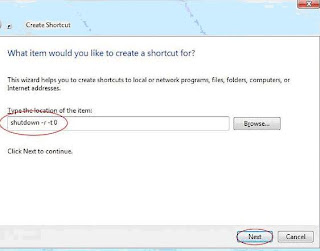
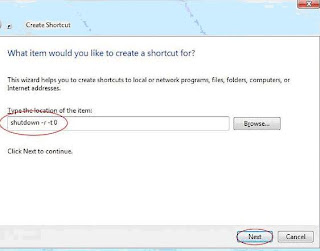
 2) Now type in "shutdown -r -t 0" at shortcut path and click NEXT:

 Guide create windows shutdown shortcut 

3) Give the icon name “Windows Shutdown icon” and click Finish: 

Create Windows Restart shortcut 

4) Now you have Windows shutdown icon on your desktop.

Shutdown PC with single click 

How to create windows restart shortcut icon.

 To create shortcut for windows restart type, type this "shutdown -s -t 0" for short cut. hope you understand this windows guide for creating shortcuts for restart and windows shutdown.