Windows network troubleshooting Tutorial.
Fix connected to Unidentified Network.
Windows can sometimes cause network adapters to show up as connected to an "Unidentified Network", sometimes limiting the network to local access only.

There are many reasons that can cause Unidentified Network problem in Windows computer, but some suggested solutions to try are:
Steps to repair Windows Network Problem.
• Reset Router using the web control panel.
• Update network adapter drivers.
• Temporary disable any Anti-Virus/Firewall package to see if the problem is resolved.
• Try assigning a static IP address to the network card.
• Disable IPv6 on old network cards / routers.
These suggestions may help you to narrow down the cause of the "unidentified network" problem.
Troubleshooting
computer network is among the most important job descriptions of the
network administrators, system administrators, network technicians and
the IT consultants. A computer network can have different kinds of
problems such as it can be infected with virus and spyware, attacked by
hackers, accessed by unauthorized users and may face connectivity
failure issues due to the faulty network devices or configurations.
Following is a list of the basic network troubleshooting commands that
are built-in the Windows based operating systems and UNIX etc. The right
use of these troubleshooting commands can helps a lot in diagnosing and
resolving the issues with windows computer network. few more windows Windows tips.
List of Command used for computer network troubleshooting in windows, Unix, Linux and Macintosh.
1) PING command.
PING full form is Packet INternet Gopher or Packet INter-network Gopher.
Ping
is the most important network troubleshooting command and it checks the
connectivity with the other computers. For example your system’s IP
address is 10.10.10.10 and your network servers’ IP address is
10.10.10.1 and you can check the connectivity with the server by using
the Ping command in following format.
At DOS prompt type Ping 10.10.10.1 and press enter.
If
you get the reply from the server then the connectivity is OK and if
you get the error message like this “Request time out” this means the
there is some problem in the connectivity with the server.
2) IPCONFIG command for network repair.
IPCONFIG full form is Internet Protocol CONFIGuration.
IPconfig
is another important network problem troubleshooting command in Windows, Unix and Linux. It shows the IP address of the
computer and also it shows the DNS, DHCP, Gateway addresses of the
network and subnet mask.
At DOS prompt type ipconfig and press enter to see the IP address of your computer.
At DOS prompt type inconfig/all and press enter to see the detailed information.DOS full form is Disk Operating System. DHCP full form is Dynamic Host Control Protocol.
3) NSLOOKUP command to fix Network related problem.
NSLOOKUP full form is Name Server LOOKUP.
NSLOOKUP
is a TCP/IP based command and it checks domain name aliases, DNS
records, operating system information by sending query to the Internet
Domain Name Servers. You can resolve the errors with the DNS of your
network server. DNS full form is Domain Name Server.
4) HOSTNAME command for network repairs.
Hostname command shows you the computer name.
At DOS prompt type Hostname and press enter.
5) NETSTAT command for computer networking.
NETSTAT full form is NETwork STATastics.
NETSTAT utility shows the protocols statistics and the current established TCP/IP connections in the computer.
6) NBTSTAT for windows networking.
NBTSTAT full form is Net Bios TSTAT. It is used for net bios name resolution to fix network issue.
NBTSTAT helps to troubleshoot the NETBIOS name resolutions problems.
7) ARP command for networking.
ARP full form is Address Resolution Protocol.
ARP displays and modifies IP to Physical address translation table that is used by the ARP protocols.
8) FINGER command for network repair diagnosis.
Finger command is used to retrieve the information about a user on a network.
9) TRACERT command for networking.
TRACERT full form isTRACE RouTe.
Tracert
command is used to determine the path of the remote system. This tool
also provides the number of hops and the IP address of each hop. For
example if you want to see that how many hops (routers) are involved to
reach any URL and what’s the IP address of each hop then use the
following command.
At command prompt type tracert www.yahoo.com or google.com. You will see a list of all the hops and their IP addresses.
10) TRACEROUTE command for network diagnosis.
Traceroute
is a very useful network debugging command and it is used in locating
the server that is slowing down the transmission on the internet and it
also shows the route between the two systems.
11) ROUTE command for network routing table.
Route command allows you to make manual entries in the routing table.
Hopefully the above mentioned commands will help you to diagnose and troubleshooting computer networking problems.

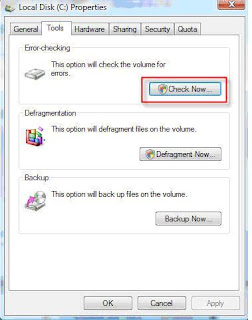


 You can repair hard disk and troubleshoot hard disk error using disk utility. Same disk utility features available in Linux, Unix and Macintosh.